How to Drive NeoPixel Addressable RGB LEDs
In this article, we will make a NeoPixel RGB LED application with Arduino.
What is NeoPixel LED?
12 bright smart LED NeoPixels are grouped in a circle with an outside diameter of 1.5″ (37mm) in the NeoPixel Ring product, which we will employ in our application. NeoPixel can be utilized with chaining logic as a serial connection. You can connect the output pin of one to the input pin of the other to use it in this manner.
Control can be accomplished with just one microcontroller pin. While inside the LED, each one can be addressed. Each includes an 18mA constant current driver, which ensures that the color remains stable even when the voltage fluctuates.
For NeoPixel Ring, a time-sensitive protocol is employed. The protocol needs a real-time microcontroller, such as an AVR, Arduino, PIC, or mbed, because timing is so important to it.
For more detailed info refer to Adafruit’s user guide.
Visit this page for some extra info about NeoPixel LED.
Materials used in the application:
- NeoPixel 12 LED Ring
- 330 Ohm Resistor
- Arduino Uno
Make the circuit’s connections in the images with the help of a 330 ohm resistor.


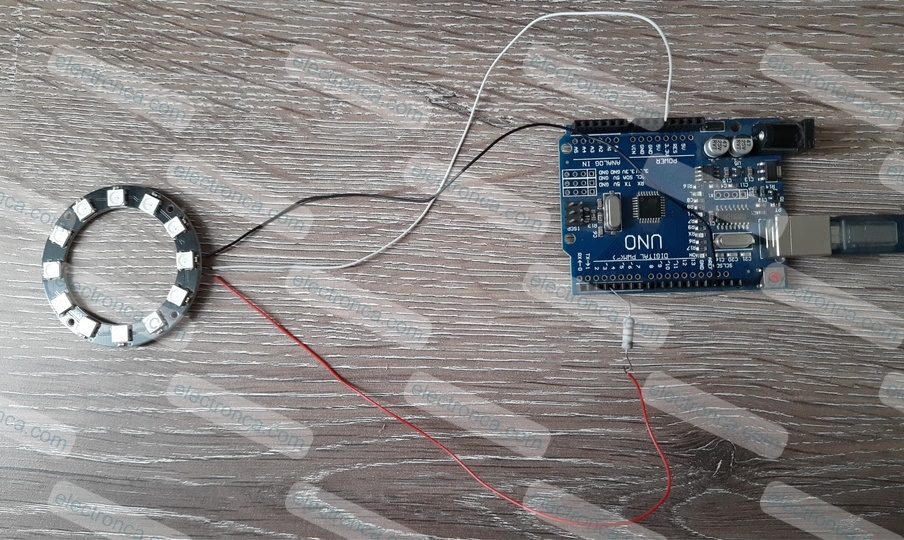
Make sure the Input (DI) wire of NeoPixel is connected to Arduino’s D3 pin according to below code.
Connect the 5V and GND wires also.
Application’s Arduino Code
Find the library for NeoPixel here: https://github.com/adafruit/Adafruit_NeoPixel
#include "Adafruit_NeoPixel.h"

#define PIN 3
#define LEDS 12

// Parameter 1 = number of pixels in strip
// Parameter 2 = Arduino pin number (most are valid)
// Parameter 3 = pixel type flags, add together as needed
//   NEO_GRB     Pixels are wired for GRB bitstream (most NeoPixel products)
//   NEO_RGB     Pixels are wired for RGB bitstream (v1 FLORA pixels, not v2)
//   NEO_RGBW    Pixels are wired for RGBW bitstream (NeoPixel RGBW products)
//   NEO_KHZ800  800 KHz bitstream (most NeoPixel products WS2812 LEDs)
//   NEO_KHZ400  400 KHz (classic 'v1' (not v2) FLORA pixels, WS2811 drivers)
Adafruit_NeoPixel strip = Adafruit_NeoPixel(LEDS, PIN, NEO_GRB + NEO_KHZ800);

int r1=33 ,r2=87 ,r3=50, t=100; //set a begining color and delay time

void setup() {
  strip.begin();
  strip.show();  // Initialize all pixels to 'off'

  //the range 0 (off) to 255 (max brightness). For example, to set a strip to 1/4 brightness:
  strip.setBrightness(64);

}

void loop()
{
  for(int i=0; i<4000; i++)
  {
      strip.setPixelColor(0, r1, r2, r3);
      strip.show(); //Show The Color
      delay(t);
      strip.setPixelColor(0, 0, 0, 0);

      strip.setPixelColor(1, r1, r2, r3);
      strip.show();
      delay(t);
      strip.setPixelColor(1, 0, 0, 0);

      strip.setPixelColor(2, r1, r2, r3);
      strip.show();
      delay(t);
      strip.setPixelColor(2, 0, 0, 0);

      strip.setPixelColor(3, r1, r2, r3);
      strip.show();
      delay(t);
      strip.setPixelColor(3, 0, 0, 0);

      strip.setPixelColor(4, r1, r2, r3);
      strip.show();
      delay(t);
      strip.setPixelColor(4, 0, 0, 0);

      strip.setPixelColor(5, r1, r2, r3);
      strip.show();
      delay(t);
      strip.setPixelColor(5, 0, 0, 0);

      strip.setPixelColor(6, r1, r2, r3);
      strip.show();
      delay(t);
      strip.setPixelColor(6, 0, 0, 0);

      strip.setPixelColor(7, r1, r2, r3);
      strip.show();
      delay(t);
      strip.setPixelColor(7, 0, 0, 0);

      strip.setPixelColor(8, r1, r2, r3);
      strip.show();
      delay(t);
      strip.setPixelColor(8, 0, 0, 0);

      strip.setPixelColor(9, r1, r2, r3);
      strip.show();
      delay(t);
      strip.setPixelColor(9, 0, 0, 0);

      strip.setPixelColor(10, r1, r2, r3);
      strip.show();
      delay(t);
      strip.setPixelColor(10, 0, 0, 0);

      strip.setPixelColor(11, r1, r2, r3);
      strip.show();
      delay(t);
      strip.setPixelColor(11, 0, 0, 0);

      //to change the colors in each cycle
      r1=r1+10;
      r2=r2+20;
      r3=r3+30;

  }
}
Here is the output of application: