
14-Preprocessor and Macros in C Programming
C Programming Lessons, Learn C Programming, Introduction to C Language, How to Program with C
This section introduces the C preprocessor. Preprocessing occurs before a program is compiled.
All preprocessor commands begin with #, and a line can only contain a space character before the preprocessor command.
The #include preprocessor command ensures that a copy of the specified file is appended to the command location.
The #include command has two forms;
#include <filename>
#include “filename”
The difference between these two is where the preprocessor looks for the file to include.
If the filename is in quotes, the preprocessor searches for the file in the directory where the file to be compiled is located after the searched file is added. This method is often used to add programmer-defined header files.
If the filename is in the opening brackets <>, this method is used to add standard library header files. The search is application dependent and usually within pre-designed files.
The #define command creates symbolic constants (constants represented by symbols) and macros (defining operations as symbols).
#define descriptive_replacement_text
when this line is in a file, the identifier is automatically replaced with the replacement text in all places where the identifier is in the file before the program is compiled, for example;
#define PI 3.14
Macros
A macro is an action defined within the #define preprocessor instruction. As with symbolic constants, the macro descriptor is replaced in the program by the replacement text before the program is compiled.
Let’s consider a single argument macro definition for the area of a circle;
#define CIRCLE_AREA(x) ((PI)*(x)*(x))
In the program, when CIRCLE_AREA(y) is encountered, the value of y will be replaced by x in the displacement text, and the symbolic constant PI will be replaced by its value (defined), thus expanding the macro.
area = CIRCLE_AREA(4); → area = ((3.14)*(4)*(4));
expands in the form and is calculated and assigned to the area value.
The CIRCLE_AREA macro can also be defined as a function.
Circle area function;
double circleArea(double x)
{
	return 3.14*x*x;
}
It performs the same calculation as the CIRCLE_AREA macro, but a function call related to the circleArea function must be used. The advantage of the CIRCLE_AREA macro is that the macros insert the code directly into the program. The program remains readable. The disadvantage is that the argument is calculated twice.
The #undef preprocessor command is used to expire symbolic constants and macros.
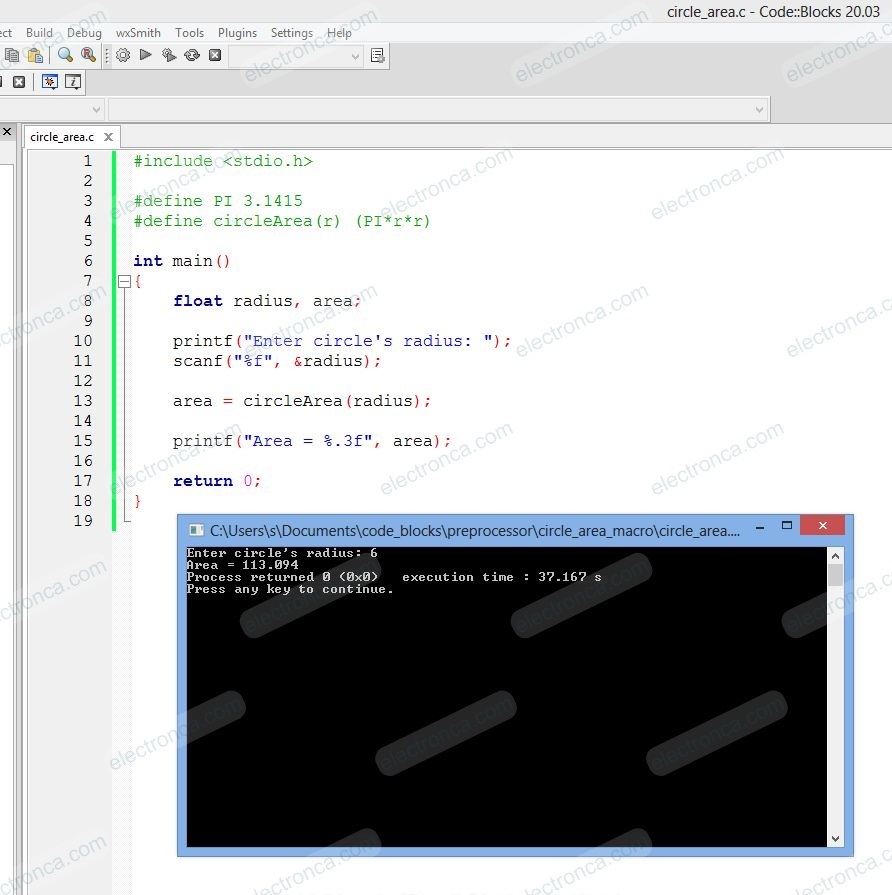
Example
#include <stdio.h>

#define PI 3.1415
#define circleArea(r) (PI*r*r)

int main()
{
    float radius, area;

    printf("Enter circle's radius: ");
    scanf("%f", &radius);

    area = circleArea(radius);

    printf("Area = %.3f", area);

    return 0;
}
Conditional Compilation
In this technique, if the condition is true, then the block will be pass from the compilation process, if the condition is false then the complete block of the statements will be removed from the source at the time of the pre-processor.
#if constant_expression
   statement sequence
#endif
#else works much like the C keyword else.
#elif means “else if” and establishes an if else-if compilation chain.
#ifdef and #ifndef
#ifdef means “if defined”, and is terminated by an #endif.
#indef means “if not defined”.
Example
# include <stdio.h>
# define PI 3.14
void main()
{
   #ifdef PI
        printf("PI constant defined\n");
   #endif

   //Note that the line in the compiler is paler
   //than the others, since the above definition was made.
   #ifndef PI
        printf("PI Not defined ");
   #else
        printf("continue.. \n");
   #endif
}

Line Numbers
The #line preprocessor command ensures that all subsequent source code lines are numbered starting from the value of the specified integer constant.
#line 100
After the command, the source line is numbered starting from 100. File name can be included.
#line100 “file1.c”
Predefined Symbolic Constants
It starts with 2 underscores and ends with 2 underscores.
These identifiers and the ‘defined’ identifier cannot be used within the #define or #undef commands.
__LINE__ line number of the source code used (an integer constant)
__FILE__ default name of source code (a string)
__DATE__ the date the source code was compiled (MM//DD//YYYY)
__TIME__ when the source code is compiled (hh:mm:ss)
#include <stdio.h>
int main()
{
   printf("Current time is: %s",__TIME__);
}

Assertions
The assert macro is defined in the header file assert.h. Tests the value of an expression. If the value of the expression is 0 (false), assert prints an error message and calls the abort function to terminate the program. It is a useful debugging tool for testing whether a variable has a correct value. For example, let’s assume that the variable x should never exceed 10 in a program;
assert (x<=10);
If x is greater than 10, the program will terminate.
exit() and atexit functions in C
The function exit; terminates calling process normally. Before terminating a process, it performs the following operations:
Functions registered with atexit are called.
All streams/files are closed and flushed if buffered, and all files created with tmpfile are removed.
Control is returned to the calling/host environment.
void exit(int status);
#include <stdio.h>
#include <stdlib.h>

int main()
{
    printf("Program starts..\n");

    //Terminating program using exit
    exit(0);

    printf("This line won't be displayed..\n");

    return 0;
}

int atexit(void (*func)(void));
atexit; registers the function pointed to by func to be called when the program terminates. Upon normal termination of the program, function pointed by func is automatically called without arguments. You can register your termination function anywhere in program.
This function returns zero value, if the function was successfully registered, otherwise returns a non-zero value.
#include <stdio.h>
#include <stdlib.h>

void myFunction()
{
    printf("Program ends here..\n");
    getch();
}
int main()
{
    printf("Program starts.. \n");
    atexit(myFunction);
    return 0;
}

