12-File Handling in C Programming
C Programming Lessons, Learn C Programming, Introduction to C Language, How to Program with C
File Handling in C, C Programming, Read and Write Data to Files
What are the files used for?
It is used to store data after the program is terminated. A file is a collection of related records.
The fopen() function is used to open a file and the fclose() function to close it.
The fgetc function, like getchar, reads a character from the file.
The fgetc(stdin) call reads a character from stdin, i.e. standard input. This call is equivalent to getchar().
The fputc function, as an argument, takes a character to print and a pointer to the file in which the character will be printed.
The call fputc(‘a’,stdout) prints the character ‘a’ to stdout i.e. standard output. This call is equivalent to putchar(‘a’).
| Function | Its Task |
| fputc | saves one character data to file |
| fputs | saves a string of characters to the file |
| fwrite | saves a record, string, or character to the file as binary |
| fprint | saves formatted data to file |
| fgetc | reads one character data to file |
| fgets | reads a string of characters from the file |
| fread | reads a record, string, or character into a file in binary |
| fscanf | reads the data in the file by formatting it |
When working with files, pointer definition must be made.
FILE *fPtr;
The syntax structure required to open a file is as follows;
fPtr = fopen(“fileopen”,”mode”);
Let’s take a look at these mods mentioned
| MOD | |
| r | open a file for reading |
| w | create a file for writing |
| a | add; to append to the end of a file |
| r+ | open a file to update (read and write) |
| w+ | create a file to update. If the file already exists, its previous content is deleted. |
| a+ | add; open or create a file to update, writing is done to the end of the file. |
*A file that needs to be opened in update mode (r+), opening it in write mode (w+) will delete all the contents of the file
Example 1
#include<stdio.h>
#include<stdlib.h>
int main()
{
FILE *file_1;
file_1 = fopen("trial.txt", "w");
fprintf(file_1, "Hello World!! ");
fclose(file_1);
return 0;
}

Example 2 : Storing Data in a File
#include <stdio.h>
#include <stdlib.h>
int main()
{
int account;
char name[30];
double balance;
FILE *cfPtr; //cfPtr = customer.dat file pointer
if ((cfPtr=fopen("customer.dat", "w"))==NULL)
printf("file couldn't open");
else
{
printf("Enter account number, Name and Balance: \n");
printf("Enter EOF character to end \n");
printf("?");
scanf("%d %s %lf", &account, name, &balance); //writes the data to the file
while(!feof(stdin))
{
fprintf(cfPtr,"%d %s %.2lf\n",account,name,balance);
printf("?");
scanf("%d %s %lf", &account, name, &balance);
}
fclose(cfPtr);
}
return 0;
}

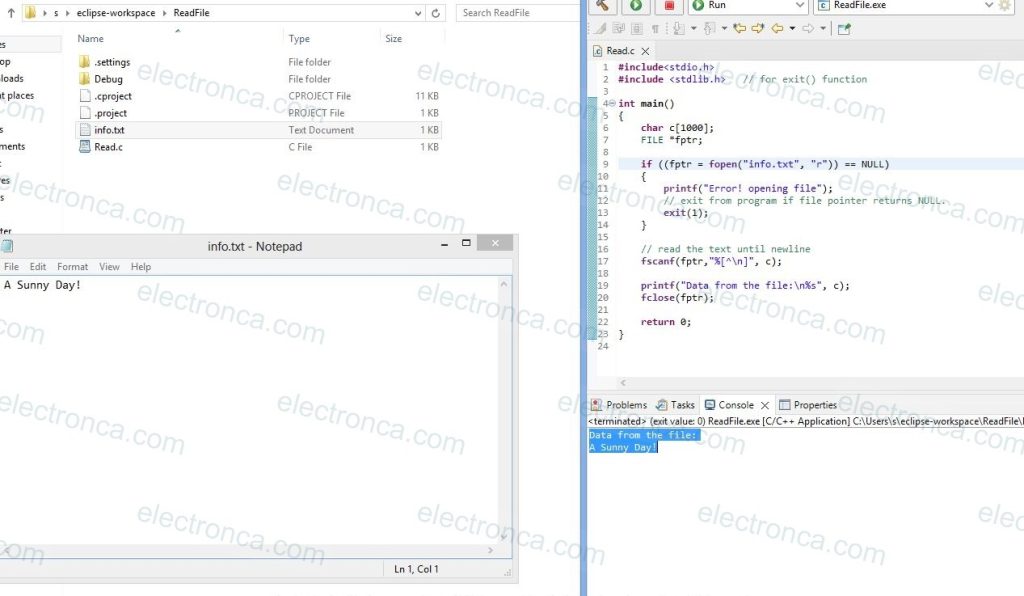
Example: Read Data from a File
#include<stdio.h>
#include <stdlib.h> // for exit() function
int main()
{
char c[1000];
FILE *fptr;
if ((fptr = fopen("info.txt", "r")) == NULL)
{
printf("Error! opening file");
// exit from program if file pointer returns NULL.
exit(1);
}
// read the text until newline
fscanf(fptr,"%[^\n]", c);
printf("Data from the file:\n%s", c);
fclose(fptr);
return 0;
}